Please select an article from the left menu to display its content.
The Series Generator lets you define how numbering/reference codes are generated for each module — such as shipment waybill numbers, invoice numbers, or credit notes — including a prefix pattern, a starting number, and optional conditional rules for special cases.
Overview
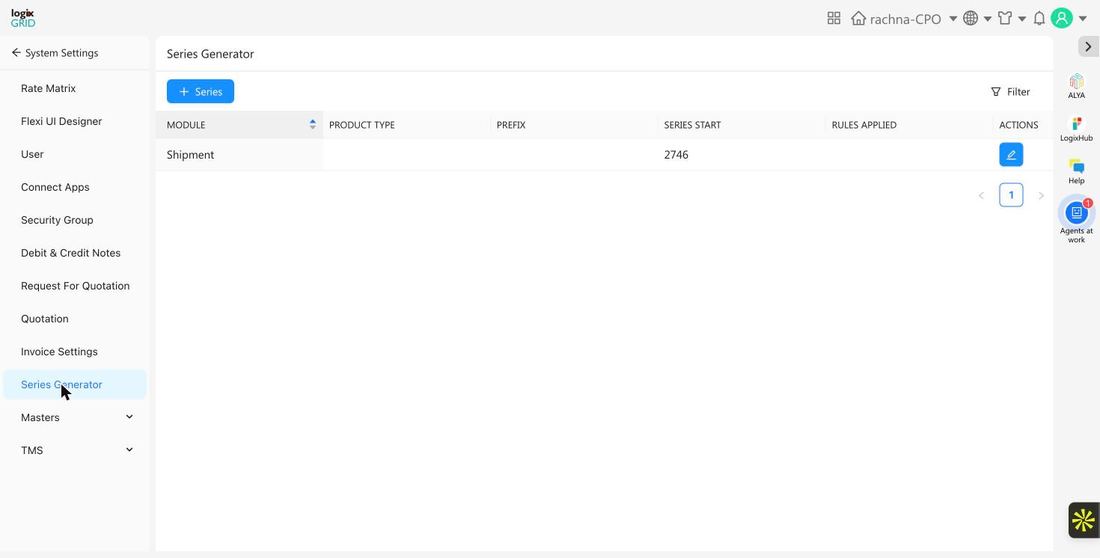
A Series defines the numbering pattern used to generate reference codes for a given module — for example, Shipment waybill numbers. Each series has a Prefix (which can include placeholders like Service Code or Customer Code) and a starting number. The Series list shows every configured series with its module, product type, prefix, current series start, and whether conditional rules are applied.
Prerequisites
- Admin access to System Settings.
- Decide the module and, where relevant, product type the series applies to before creating it — each module/product type combination should generally have only one active series.
Create a New Series
- Go to System Settings → Series Generator.
- Click + Series to open the series creation form.
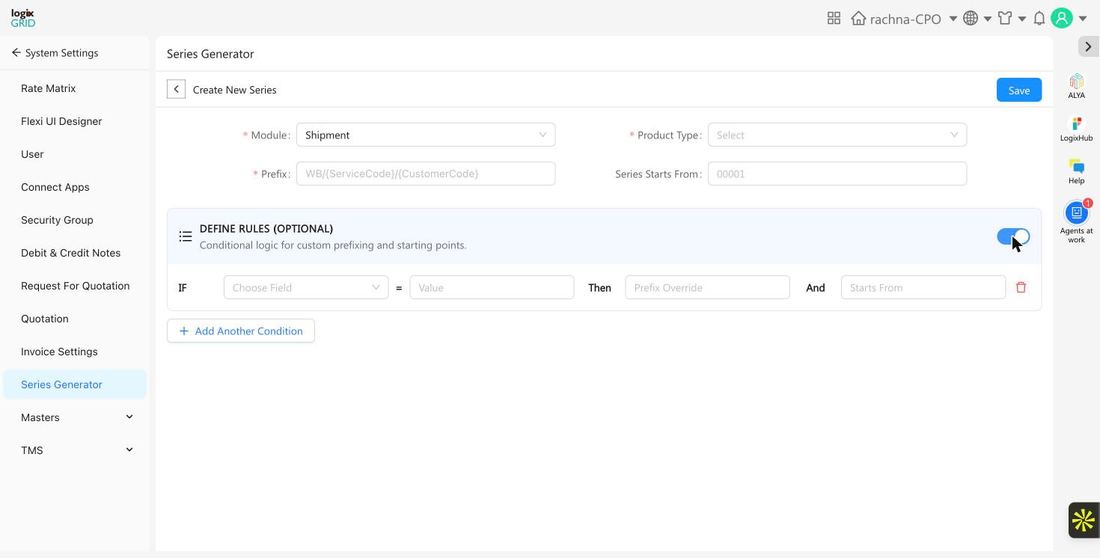
- Select the required Module this series applies to.
- If the module is Shipment, also select the required Product Type (DMS, TMS, or FreightNX).
- Enter the required Prefix pattern — placeholders like
{ServiceCode}and{CustomerCode}can be combined with static text, e.g.WB/{ServiceCode}/{CustomerCode}. - Optionally set Series Starts From to control the first number issued.
- Optionally turn on Define Rules to add conditional logic — see Define Rules below.
- Click Save to activate the series.
Field Reference
| Field | Required | Description | Examples / Notes |
|---|---|---|---|
| Module | Yes | The module this numbering series applies to. | Automation, Credit Note, Debit Note, Delivery Run Sheet, Driver, Invoice, Lead, Quotation, RFQ, Shipment, Workflow |
| Product Type | Conditional | Required only when Module is Shipment — narrows the series to a specific product line. | DMS, TMS, FreightNX |
| Prefix | Yes | The prefix pattern used before the running number. Supports placeholders. | WB/{ServiceCode}/{CustomerCode} |
| Series Starts From | No | The starting number for the series. Defaults if left blank. | 00001 |
Define Rules (Optional)
Toggle on Define Rules to apply conditional prefixing and starting points based on shipment field values, instead of one fixed prefix for the whole series. Each rule follows an IF / THEN / AND pattern:
- IF — choose a field to evaluate, such as Start Location, End Location, Reference Number, Number Of Packages, Unload Packages, Total Amount, Service Tax, or Actual Weight, and a value to match.
- THEN — a Prefix Override to use instead of the default prefix when the condition matches.
- AND — a Starts From value to use for the numbering when the condition matches.
Click Add Another Condition to define more than one rule; conditions are evaluated in order.
Usage Across Modules
- DMS / FreightNX / TMS: Shipment series generate waybill/reference numbers automatically when a new shipment is created, following the configured prefix and starting number.
- Finance: Invoice, Credit Note, and Debit Note series keep numbering consistent and sequential for accounting and audit purposes.
Notes / Best Practices
- Keep only one active series per Module (and Product Type, for Shipment) to avoid ambiguous numbering.
- Use conditional rules sparingly — they're most useful when different origins, customers, or shipment types genuinely need distinct prefixes or numbering ranges.
- Avoid changing a series' Prefix or Starts From after it's in active use, since it can create gaps or inconsistent formats across already-issued numbers.
FAQs
- What happens if I don't set Series Starts From?
- The series uses its default starting number.
- Can I have different series for DMS and FreightNX shipments?
- Yes — for the Shipment module, Product Type lets you configure a separate series per product line.
- Do conditional rules override the base Prefix entirely?
- Yes, when a rule's IF condition matches, its Prefix Override and Starts From are used instead of the series' default values.