Please select an article from the left menu to display its content.
The Equipment module lets you define the physical capacity profile of vehicles, trailers, and containers used for shipments. Each equipment record captures clearance dimensions and payload/volume limits, so the system can match shipments to the right equipment during load planning.
Overview
An Equipment record represents a type of vehicle, trailer, or container — for example a 22 ft flatbed trailer or a 40 ft dry van container. Each record stores its internal clearance dimensions and physical capacity (maximum volumetric cube and payload weight), which the system uses to check whether a shipment's cargo will fit and stay within weight limits. The Equipment list shows equipment name, max length, max payload weight, and max volumetric cube for every configured type.
Prerequisites
- Admin or Fleet/Operations role with access to System Settings.
- Know the internal clearance dimensions and rated capacity of the vehicle, trailer, or container you're adding, since these values drive load-fit calculations.
Create a New Equipment
- Go to System Settings → Masters → Equipment.
- Click + Equipment to open the equipment creation form.
- Enter the Equipment Name.
- Under Internal Clearance Dimensions, enter Max Length (required), and optionally Max Width and Max Height, then choose a Dimension UOM.
- Under Physical Capacity Profile, select a Volume UOM (defaults to CBM), and enter Max Volumetric Cube and Max Payload Weight, then choose a Weight UOM.
- Click Save to add the equipment to the list.
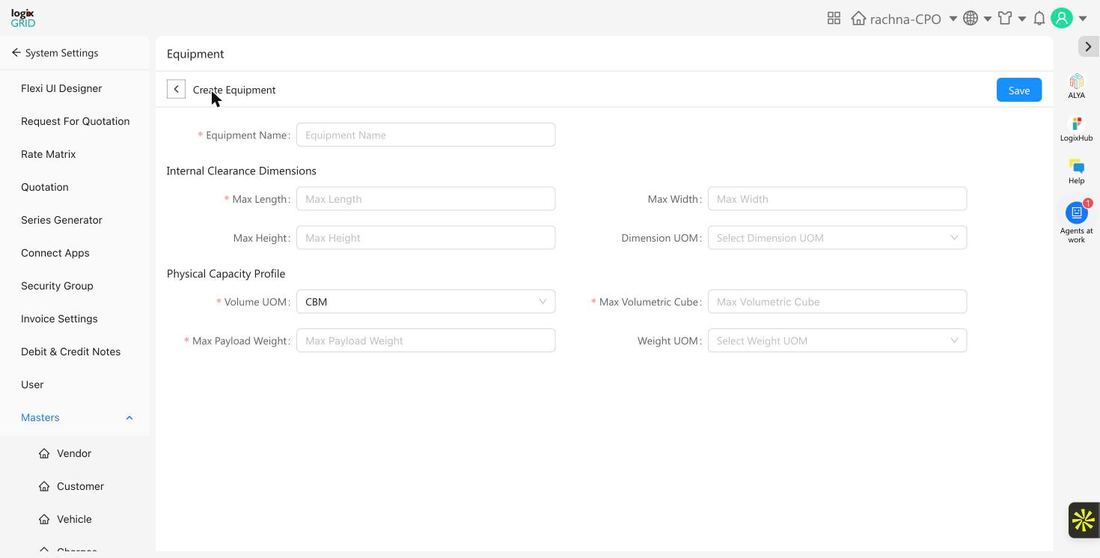
Field Reference
| Field | Required | Description | Examples / Notes |
|---|---|---|---|
| Equipment Name | Yes | Descriptive name for the vehicle, trailer, or container type. | 22 ft Flatbed Trailer, 40 Ft Dry Van Container, 8 ft Pickup Truck |
| Max Length | Yes | Maximum internal usable length of the equipment. | e.g. 22, 40, 44 |
| Max Width | No | Maximum internal usable width. | — |
| Max Height | No | Maximum internal usable height. | — |
| Dimension UOM | No | Unit of measure used for length/width/height. | ft, m |
| Volume UOM | Yes | Unit of measure for volumetric capacity. Defaults to CBM (cubic meters). | CBM |
| Max Volumetric Cube | Yes | Maximum cargo volume the equipment can carry. | e.g. 9.97, 77.02, 94.69 |
| Max Payload Weight | Yes | Maximum weight the equipment is rated to carry. | e.g. 500, 20000, 27000 |
| Weight UOM | No | Unit of measure for payload weight. | kg, lb |
Usage Across Modules
- FreightNX / TMS: Equipment records are used to check whether a shipment's total weight and volume fit within a vehicle or container's rated capacity before it's assigned to a trip.
- Load Planning: Max Volumetric Cube and Max Payload Weight let planners compare available capacity across equipment types when consolidating shipments.
Notes / Best Practices
- Enter accurate internal clearance dimensions rather than external/overall dimensions, since these drive real load-fit checks.
- Keep Max Payload Weight and Max Volumetric Cube consistent with manufacturer-rated capacity, not a rounded estimate, to avoid overloading.
- Use consistent units (UOM) across similar equipment types to make capacity comparisons easier.
FAQs
- Can I edit an equipment record's capacity after it's created?
- Yes. Open the equipment from the list and update its dimensions or capacity values, then save.
- What happens if a shipment exceeds an equipment's rated capacity?
- The system flags the mismatch during assignment so planners can choose a different equipment type or split the load.
- Is Volume UOM always CBM?
- CBM is the default, but you can select a different Volume UOM if your operation uses another standard.