Please select an article from the left menu to display its content.
The Document Dashboard is the landing screen for LogixDocs. It gives you a quick summary of your document volume and status, so you can see what needs attention without opening Document Workspace and filtering through every record.
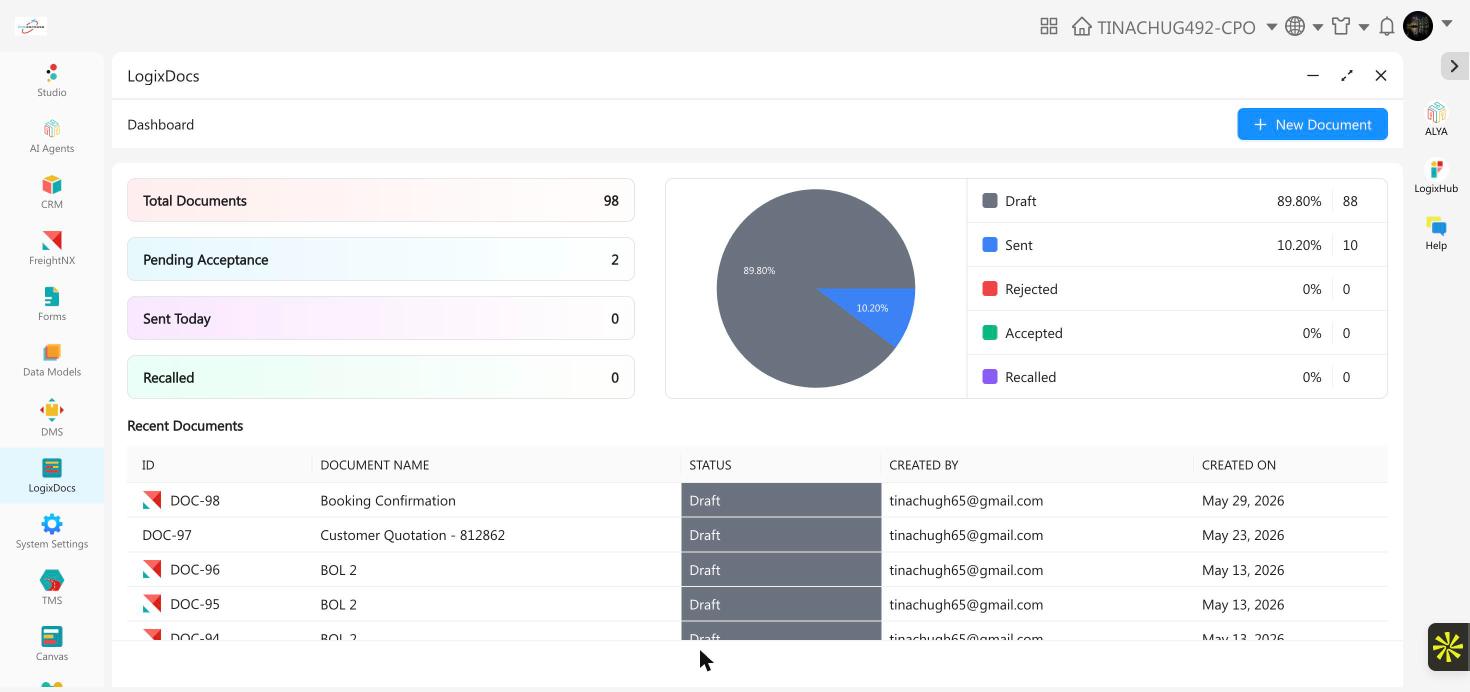
Summary cards
| Card | What it shows |
|---|---|
| Total Documents | The total number of documents you have created in LogixDocs, across every status. |
| Pending Acceptance | Documents that have been sent and are still waiting for the recipient to accept or reject them. |
| Sent Today | Documents sent to a recipient so far today. |
| Recalled | Documents you sent and then withdrew before the recipient acted on them. |
Status breakdown
A pie chart, with a legend beside it, shows the percentage and count of your documents in each status: Draft, Sent, Rejected, Accepted, and Recalled. Use it to see at a glance whether documents are piling up in Draft, or whether Rejected or Recalled cases need investigating.
Recent Documents
A list of your most recently created documents, with their ID, name, status, creator, and creation date. It's a read-only summary — to open, edit, send, or download any of these documents, go to Document Workspace and use the row actions there.
Good to know
- Click + New Document at the top of the dashboard to start a new document without leaving this screen — it opens the same template picker as Document Workspace.
- The dashboard reflects every document in your organization, not just the ones you personally created.