Please select an article from the left menu to display its content.
Document Templates help standardize the creation of business documents—such as shipment confirmations or invoices—across your organization. They allow teams to save time, ensure brand consistency, and reduce manual errors by reusing predefined formats. LogixDocs provides ready-to-use templates under Available Templates, plus the ability to design, organize, and manage your own templates under My Templates.
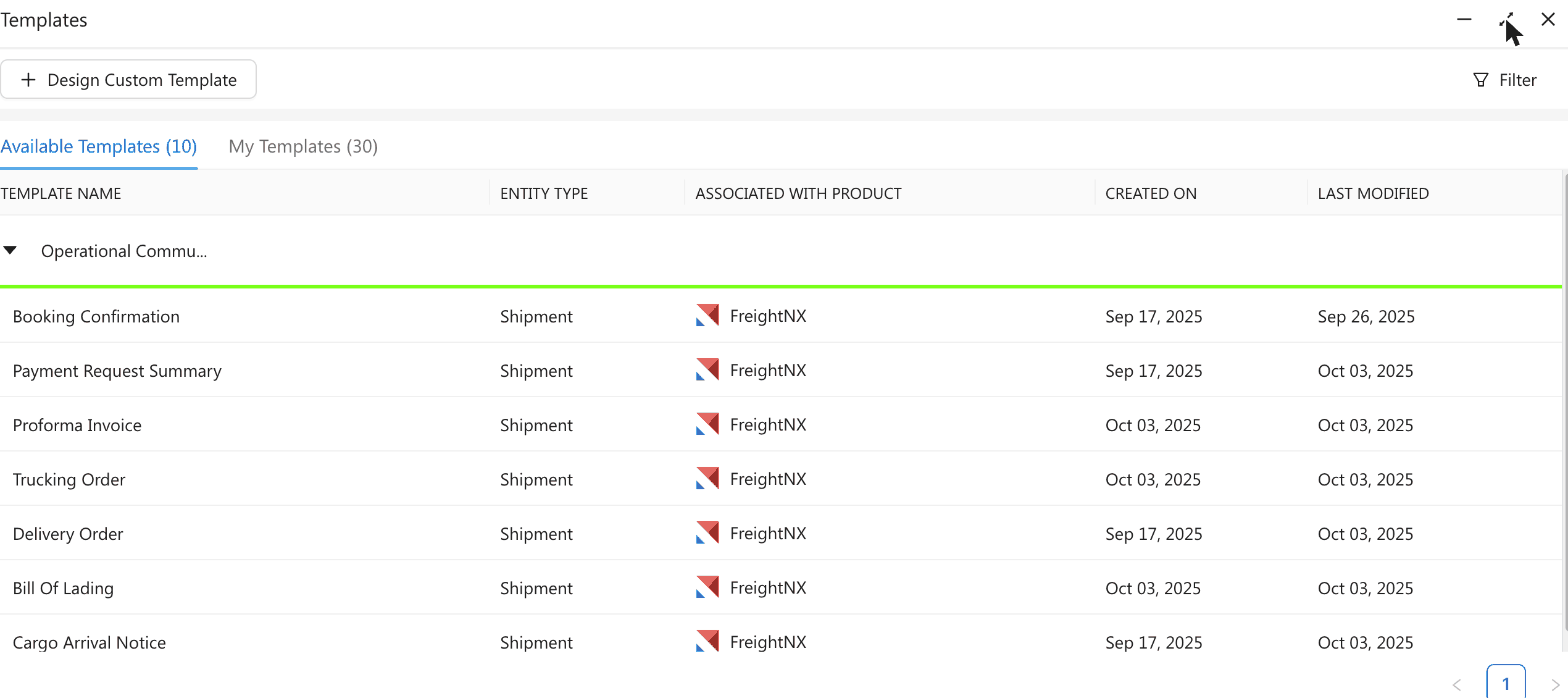
Steps to Manage Document Templates
Navigate to the LogixDocs section from the main menu, then open Templates.
Use the Available Templates tab to browse ready-made templates, or switch to the My Templates tab to view, create, and manage your organization's own templates.
On the My Templates tab, click + Design Custom Template to create a new template, or + Group to organize templates into categories.
Select a prebuilt template to start from, or design your own from scratch.
Customize the template by editing text fields, inserting company logos, and adjusting formatting as per your requirements.
Assign the template to a LogixCRM or FreightNX Product.
Save your template. It will now appear in your list and can be reused whenever needed.
To edit or remove an existing template, click the three-dot menu in the Actions column and select Edit or Delete.
Whenever you need to use a document, click the three-dot menu next to the template and select Create Document to generate it instantly.
Notes / Best Practices
Templates can be reused as often as needed, saving setup time for frequent transactions.
Use groups and categories to keep templates organized and easy to find.
Only users with the right permissions can edit or delete templates. Ensure you have admin rights before making changes.
Regularly review templates to keep documentation accurate and up to date as your business changes.